# Information for: Creator
You should read this if you want to create pages
# Complete Guide for Creating
To post on the AnatomyArchive you need an **account**. Create one [here](https://www.anatomyarchive.org/register)
### **Choose between**
#### [**Quick Pages**](https://www.anatomyarchive.org/books/information-for-creator/page/quick-pages-explained "Quick Pages explained")
Post your Studies
#### [**Complex Pages**](https://www.anatomyarchive.org/books/information-for-creator/page/complex-pages-explained "Complex Pages explained")
More Knowledge
What's allowed?
Pick any topic you want. Duplicates of a topic are allowed and wanted :)
more detailed rules here [Terms of Use](https://www.anatomyarchive.org/books/about-the-anatomyarchive/page/terms-of-use "Terms of Use")
### **The basics in under 5 minutes**
Use this [link](https://youtu.be/vHhwUyGc0Fs?si=rsD-_HqofI9ab9fA "AnatomyArchive Introduction") or watch below
#####
### **Monthly Money Raffle for Creators 💵**
##### **Create a page, win money!**
I am doing a monthly raffle to help the AnatomyArchive (Anatomy Archive) grow. I know it is time consuming to create a page, so I want to reward you! [How to win](https://www.anatomyarchive.org/books/random-pages/page/monthly-money-raffle-for-creators "Money Raffle for Creators")
# Everything you need to know when creating
##### Feel free to search for specific topics in this page: Use Ctrl + F for example
---
#### **First of all**
1. The AnatomyArchive is **English only** as of right now.2. You need to have an account for creating a page. You can register [here](https://www.anatomyarchive.org/register)
3. You should be familiar with the [Terms of Use](https://www.anatomyarchive.org/books/about-the-anatomyarchive/page/terms-of-use "Terms of Use"), because the pages you create are free to use\* for other people.
#### **The Basics**
4\. Let‘s say you want to create a page—here are the first steps:
You go to **Shelves** (top right corner). You choose the **shelve -> book -> chapter** that is suitable for your page. Create a new page. There should be a template visible for you automatically—from here on out you are guided through the process of creating a full page.If anything you need is missing [contact me](https://www.anatomyarchive.org/books/about-the-anatomyarchive/page/contact "Contact").
5\. For the heading: Include your artist name in brackets and use the official latin name (**Terminologia Anatomica)** for the page heading if possible. Example: Musculus trapezius (xlas)
6\. I want every artist to have freedom in how he/she wants to create a page for the AnatomyArchive. Stay close to the templates, so that all pages are readable, but don't be shy to alter small things.
7. Look at the two example pages [Musculus trapezius](https://www.anatomyarchive.org/books/upper-body-dorsal/page/musculus-trapezius-las "Musculus trapezius (xlas)") and [Musculus rectus abdominis](https://www.anatomyarchive.org/books/upper-body-ventral/page/musculus-rectus-abdominis-las "Musculus rectus abdominis (xlas)") for reference. Feel free to copy from them.
#### **Also Important**
8\. You can save a page as a draft, close the site and work on it later. However, if you publish a page and it is not finished yet -> add the tag "not final" (you can add tags on the right hand side in the page editor)and write this somewhere:
not final
9. Turn on shortcuts, makes your life easier. You can find them in [My Account](https://www.anatomyarchive.org/my-account/shortcuts).
10\. Avoid using/drawing explicit content as much as you can -> I don't want to age restrict the site, if possible.
#### **The Drawings**
11\.
- You can technically use any image size you want, but I would **recommend staying below 500 KB per image** for the sake of SEO
- For digital art I liked 1500x1000px and saving it as a JPG instead of PNG, you can do whatever you want though
- The **minimum width however is 350px** so that the image fills the whole mobile width
- Avoid putting 2 pictures beside each other (it causes bugs sometimes)
- If possible draw on grey background, so that its appealing in both dark and white mode
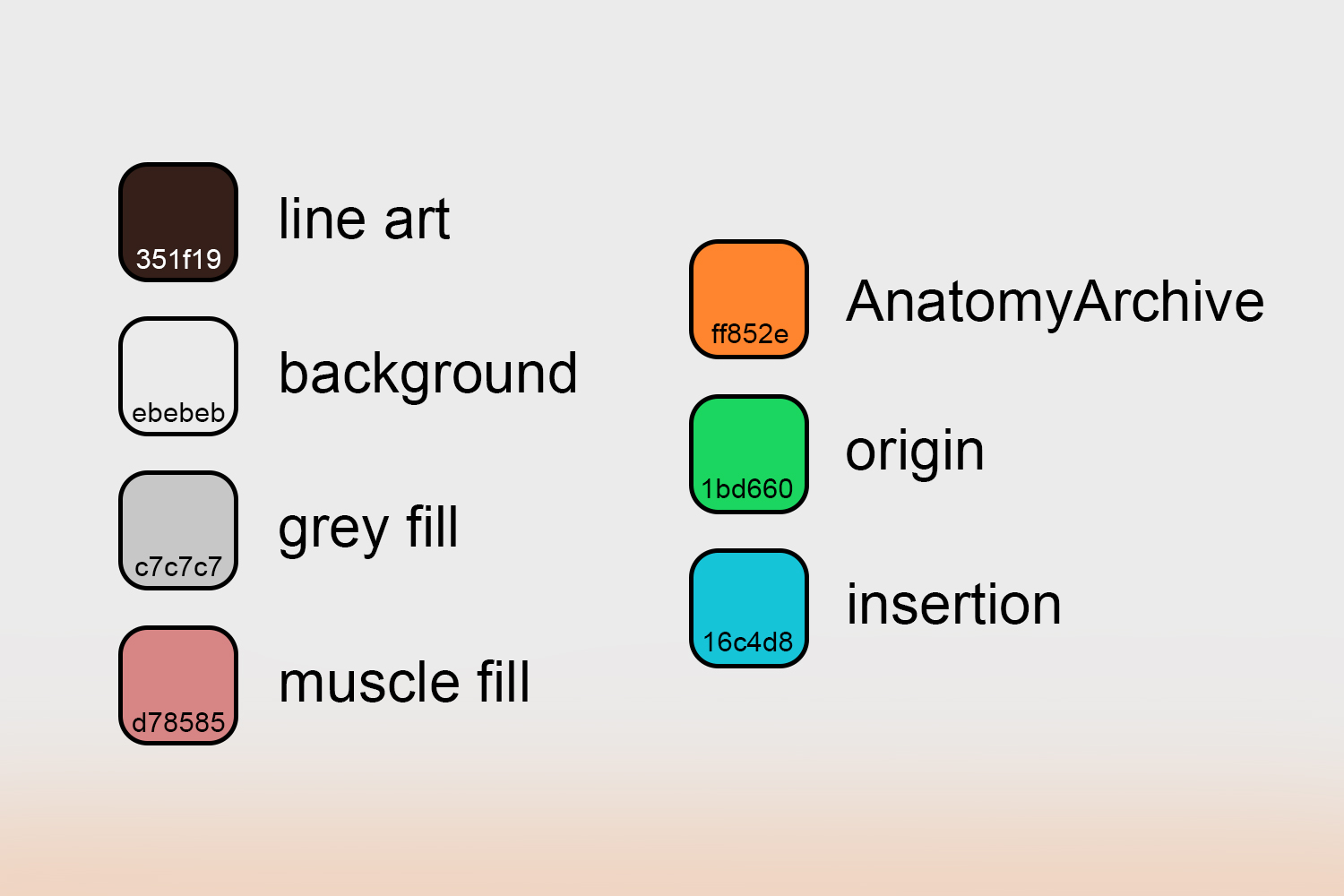
- Here is a color sheet for some important colors, in case you want to use them (you don't have to)
[](https://www.anatomyarchive.org/uploads/images/gallery/2025-04/color-sheet.jpg "color sheet")
**If you have questions about any of this ->** [**contact me please**](https://www.anatomyarchive.org/books/about-the-anatomyarchive/page/contact "Contact")
# Quick Pages Explained
#### Quick Pages are an option to post anatomy-related content with **minimal time effort**.
No need for complex explanations, just post your studies.
---
####
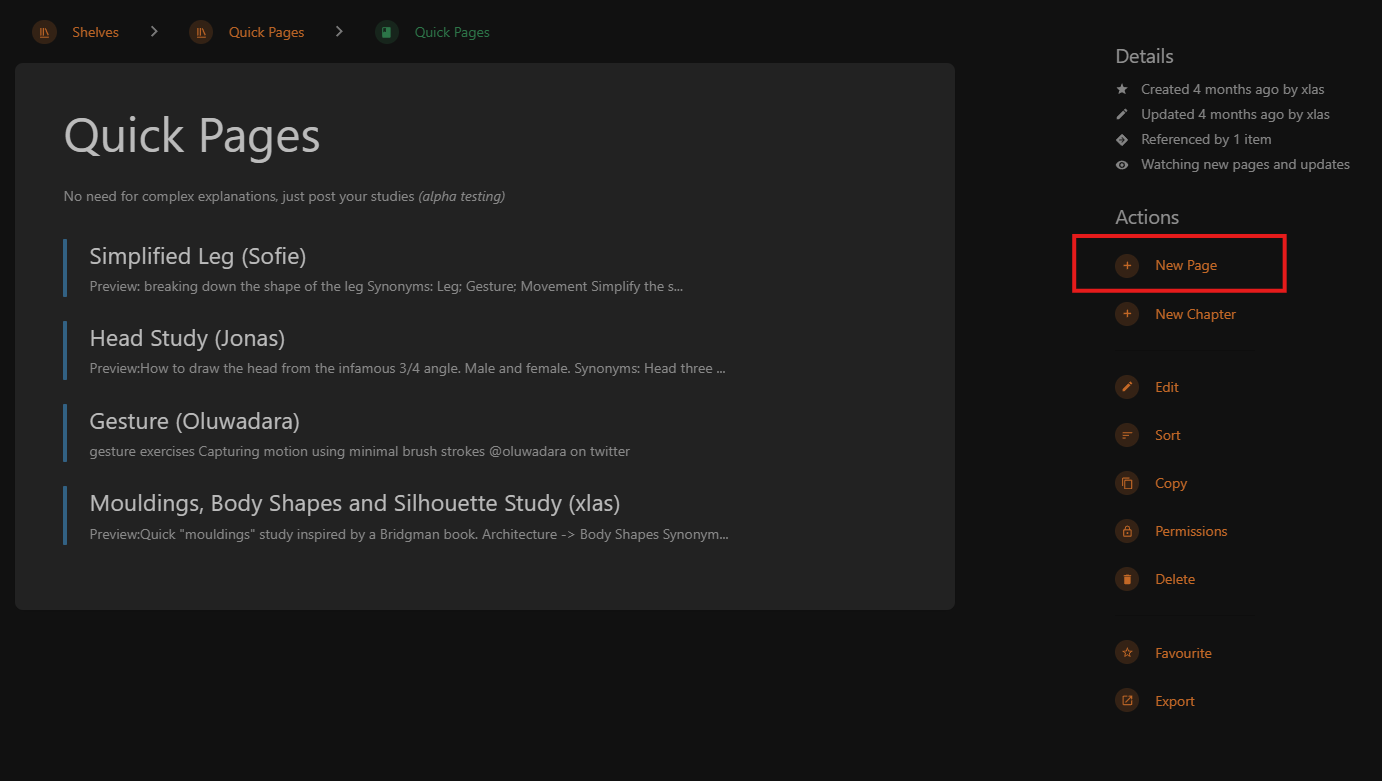
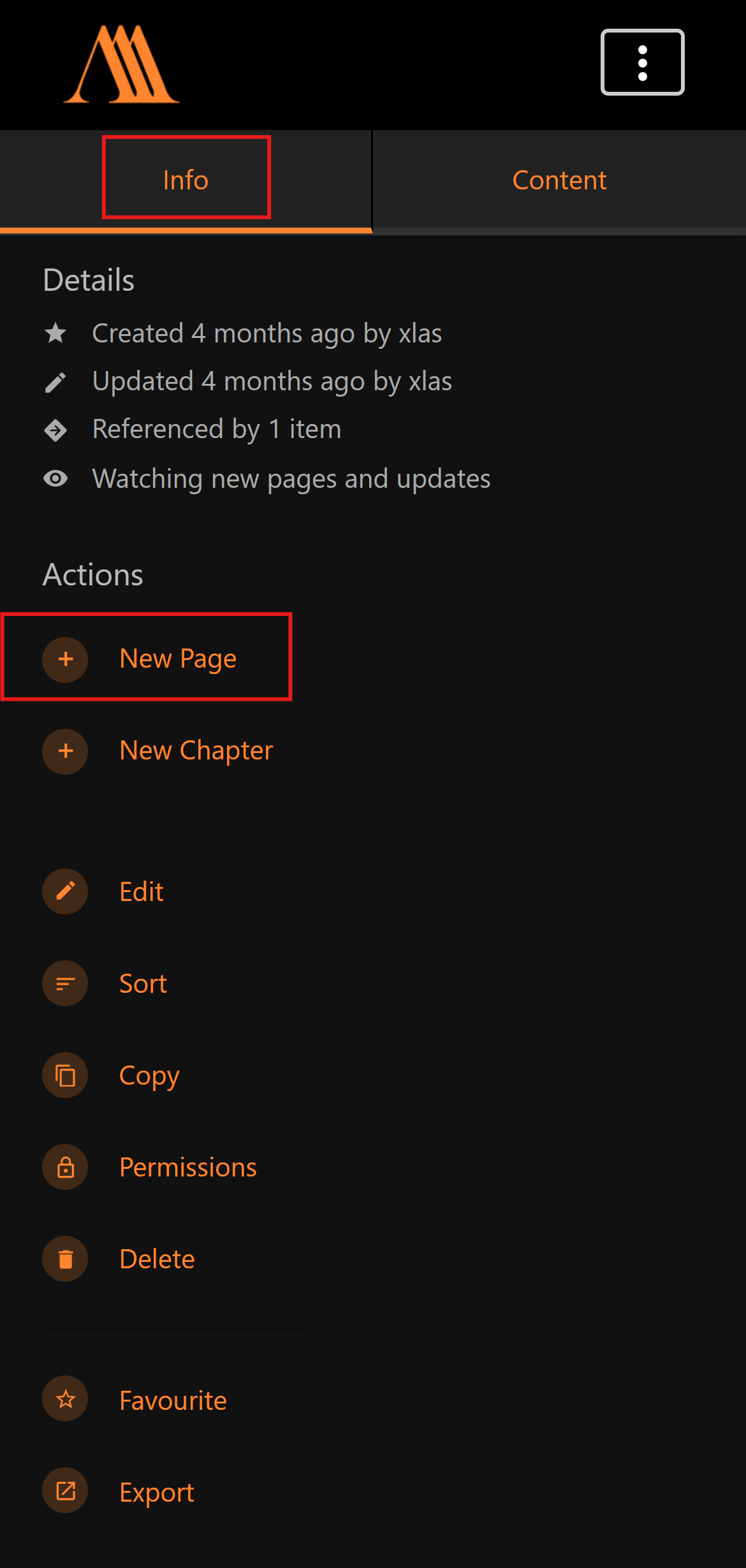
[**Click here**](https://www.anatomyarchive.org/books/quick-pages "Quick Pages") to create your own Quick Page(You need an [account](https://www.anatomyarchive.org/register "register"))How it works
### **How it works**
PC:
[](https://www.anatomyarchive.org/uploads/images/gallery/2026-01/scaled-1680-/create-new-quick-page-desktop.png)
Mobile:
[](https://www.anatomyarchive.org/uploads/images/gallery/2026-01/scaled-1680-/create-new-quick-page-mobile.png)
---
#### The **Basics** in under 5 minutes:
#### Need Help with the **Page Editor**?
### **Additional**
Additional Information
##### **Why?**
Help building the AnatomyArchive, so that one day it's the ultimate "Reference Book" (with the unique twist, that its written by many different people). Get your name out there. Connect with others that want to improve. Help other artists through your studies.
##### **Pinterest**
See **all Quick Pages** side by side on [the AnatomyArchive Pinterest Board](https://www.anatomyarchive.org/books/see-all-quick-pages-in-one-spot/page/anatomyarchive-pinterest-board "AnatomyArchive Pinterest Board").
##### **Helpful pages**
1. [Everything you need to know when creating](https://www.anatomyarchive.org/books/information-for-creator/page/everything-you-need-to-know-when-creating) ~ 3 minutes
2. [Terms of Use](https://www.anatomyarchive.org/books/about-the-anatomyarchive/page/terms-of-use "Terms of Use") ~ 1 minute
# Complex Pages Explained
#### **Complex Pages are an option to post more complete anatomy studies.**
Connect Text with Drawings (paintings, 3D sculptures, ...)
---
#####
Choose one of the current **Shelves** to create your own Complex Page (You need an [account](https://www.anatomyarchive.org/register "register"))
Just test out the website, by creating a page right now. **Nobody can see your drafts except you.**
#### [**Upper Body**](https://www.anatomyarchive.org/shelves/upper-body "Upper Body")
#### [**Lower Body**](https://www.anatomyarchive.org/shelves/lower-body "Lower Body")
#### [**Various**](https://www.anatomyarchive.org/shelves/various "Various")
How it works (in 2 Steps)I would recommend to watch the [intro video](https://www.anatomyarchive.org/link/71#bkmrk-the-basics-in-under- "AnatomyArchive basics") (5 minutes)
##### **The Template**
After creating a page you'll automatically get a **template** to help you out.
You can follow the guide or **do it your own way** and go offroad. Up to youSee all available templates [here](https://www.anatomyarchive.org/books/templates "Templates")
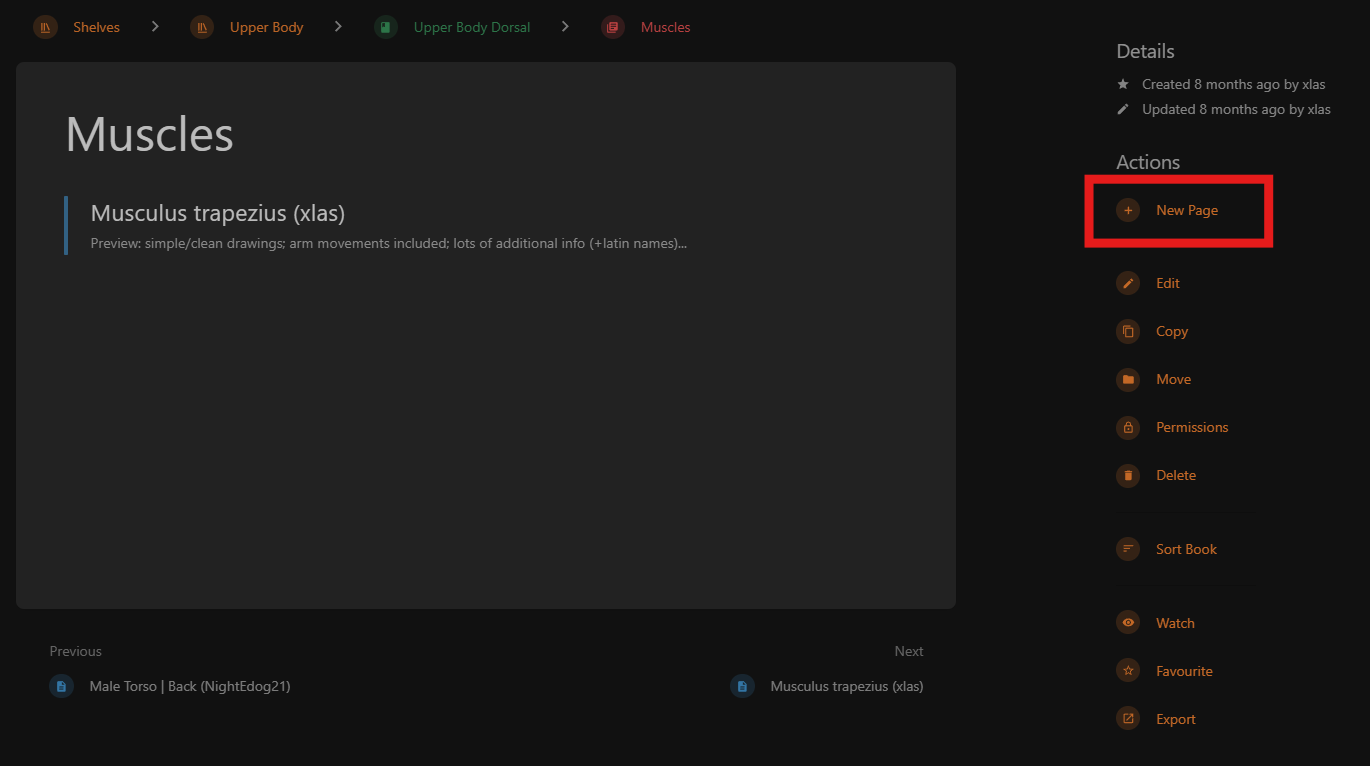
##### **Creating a New Complex Page**
PC:
[](https://www.anatomyarchive.org/uploads/images/gallery/2026-01/scaled-1680-/create-new-complex-page-pc-2.png)
Mobile:
[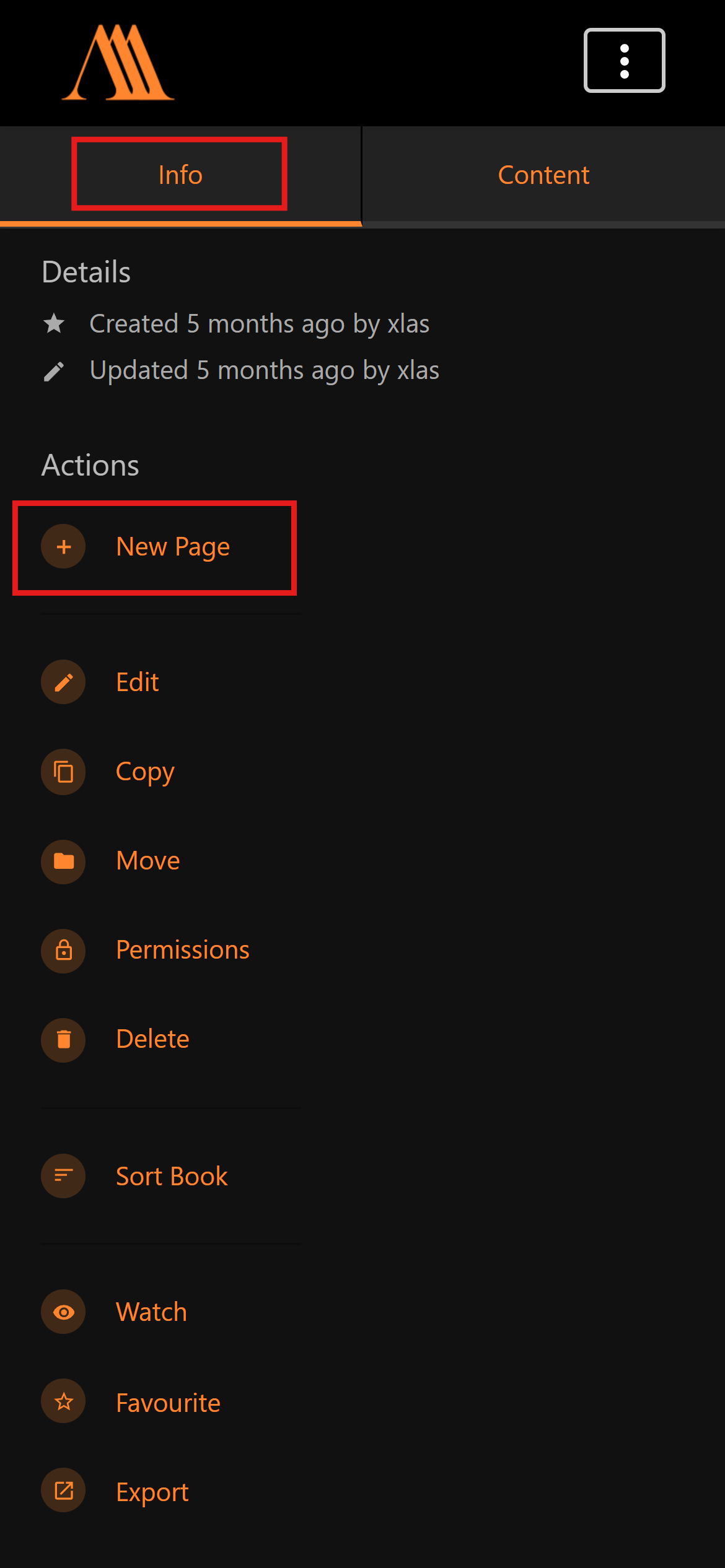](https://www.anatomyarchive.org/uploads/images/gallery/2026-01/scaled-1680-/create-new-complex-page-mobile.png)
#### The **Basics** in under 5 minutes:
#### Need Help with the **Page Editor**?
### **Additional**
Additional Information
##### **Why?**
Help building the AnatomyArchive, so that one day it's the ultimate "Reference Book" (with the unique twist, that its written by many different people). Get your name out there. Connect with others that want to improve. Help other artists through your studies.
##### **Pinterest**
See **all Studies** side by side on [the AnatomyArchive Pinterest Board](https://www.anatomyarchive.org/books/random-pages/page/anatomyarchive-pinterest-board "AnatomyArchive Pinterest Board").
##### **Helpful pages**
1. [Reference Pictures](https://www.anatomyarchive.org/books/information-for-creator/page/reference-pictures "Reference Pictures") ~ 1 minute
2. [Terms of Use](https://www.anatomyarchive.org/books/about-the-anatomyarchive/page/terms-of-use "Terms of Use") ~ 1 minute
3. [Everything you need to know when creating](https://www.anatomyarchive.org/books/information-for-creator/page/everything-you-need-to-know-when-creating) ~ 3 minutes